Pg owner app
How to Connect Your RentOk Account to Claude or ChatGPT (RentOk MCP Setup Guide)

Written by
Anil Kandpal
Read Time
7 min read
Posted on
November 24, 2026
Overview
Overview
How to Connect Your RentOk Account to Claude or ChatGPT (RentOk MCP Setup Guide)
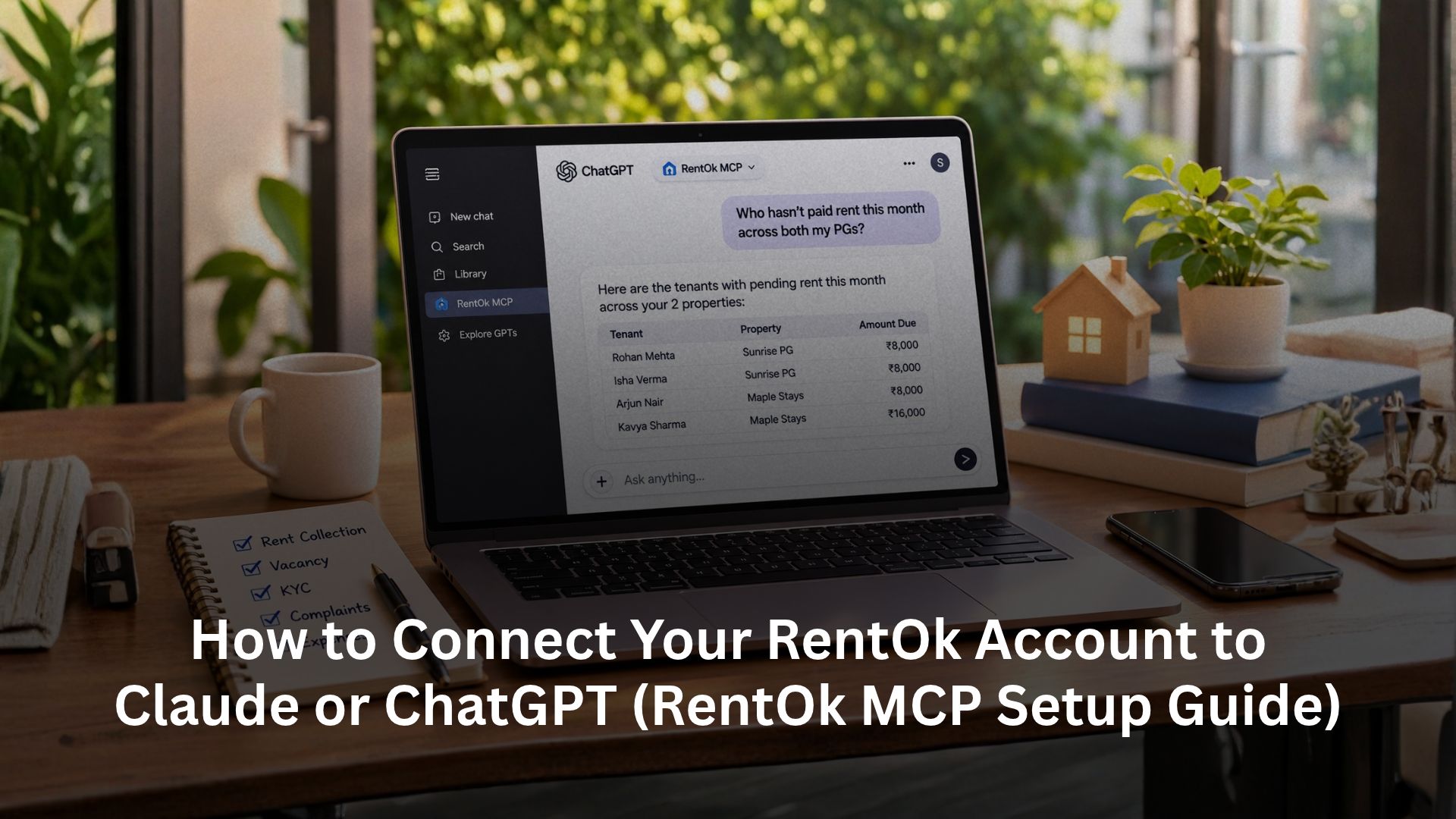
It’s 10 pm on the 5th, and you want to know which tenants in your 60-bed PG still owe rent. Normally that means opening the app, filtering dues, scrolling, and then doing it again for your second property. With RentOk MCP, you type one line into Claude or ChatGPT, “Who hasn’t paid this month, across both my PGs?”, and the answer comes back as a list.
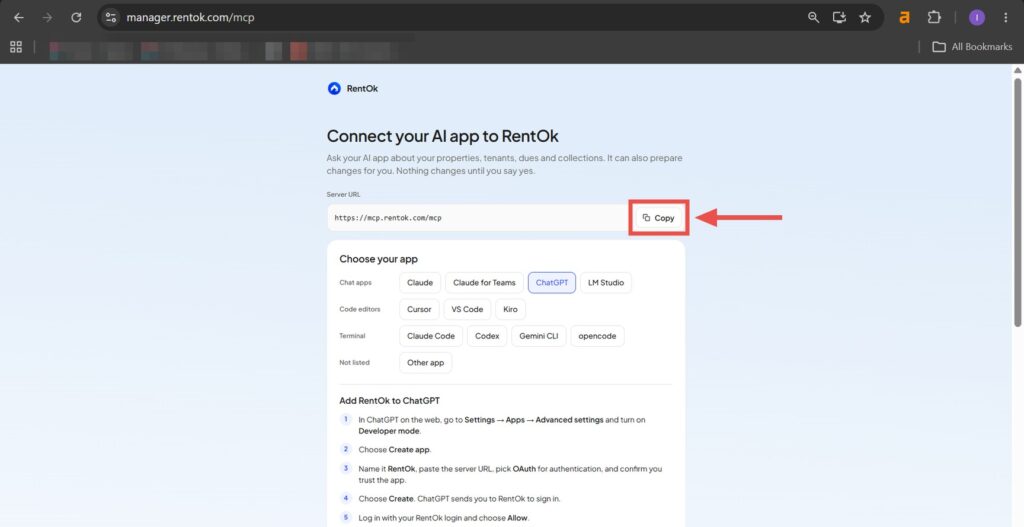
Here’s the short answer: RentOk MCP connects your RentOk account to Claude or ChatGPT, so you can ask questions about your PG in Hindi, English, Tamil, Telugu or any language you speak, and get answers from your own data. Setup takes about five minutes. You paste one link, https://mcp.rentok.com/mcp, and sign in with your RentOk account. It’s free for every RentOk user right now. It only reads your data and never changes anything in your account.
What is RentOk MCP?
RentOk MCP is a connector that lets an AI assistant read your RentOk account. MCP stands for Model Context Protocol. It’s the standard way Claude, ChatGPT and other assistants plug into outside apps.
Once it’s connected, the assistant looks up your tenants, dues, collections, beds, KYC and complaints, and answer from them directly. You don’t export a sheet and you don’t copy-paste anything. You ask, and it reads your account.
Today it covers 154 read actions across 25 areas of RentOk, including tenants (22 actions), dues (12), property details (14), agreements (10), attendance (9), beds and rooms (8), complaints (7), food (6), expenses (5) and collections (5).
What can you ask it?
Ask the way you’d ask your manager. Here are questions that work, grouped by the job you’re doing:
| Your job | Ask it this |
|---|---|
| Rent day | “Who hasn’t paid rent this month? Sort by amount due.” |
| Vacancy | “How many beds are vacant right now, and in which rooms?” |
| Move-outs | “Which tenants are on notice this month, and when does each bed free up?” |
| KYC | “Which tenants checked in this month without completing KYC?” |
| Complaints | “Which complaints have been open for more than 3 days?” |
| Money | “How much did I collect in October vs September, property by property?” |
| Expenses | “What did I spend on electricity and maintenance last month?” |
Ask it to look for things you didn’t think to ask about, too. Try: “Look at my last 6 months and tell me what’s unusual.” That’s a question no single screen in the app answers, because the answer is spread across many months of records.
Run several properties? Ask about all of them in one line. “Compare collections across all my PGs this month” gets you one answer, so you don’t have to check each property one by one.
How do I connect RentOk MCP to Claude?
You add RentOk as a custom connector, paste the server link, and sign in. It takes about five minutes.
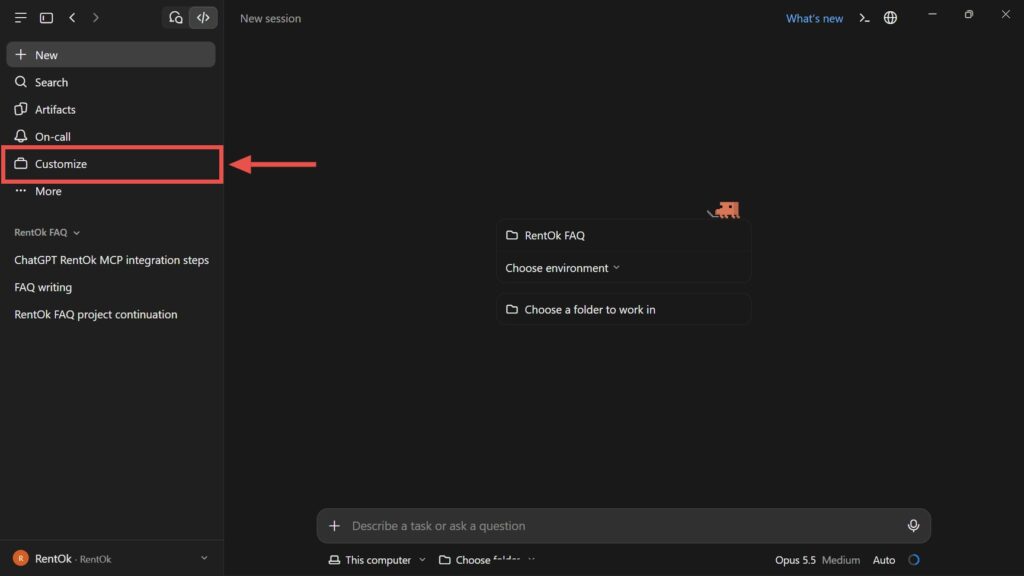
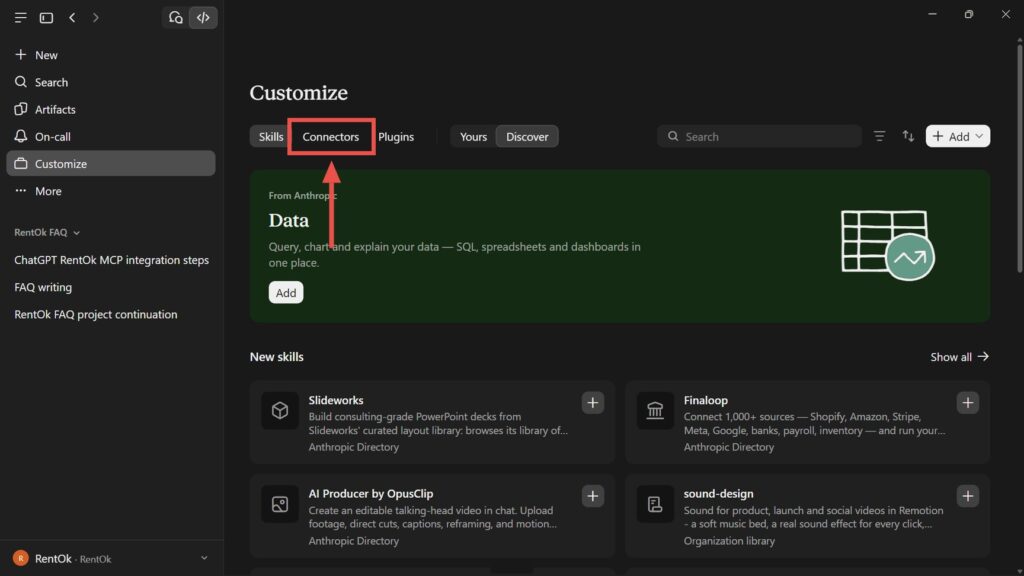
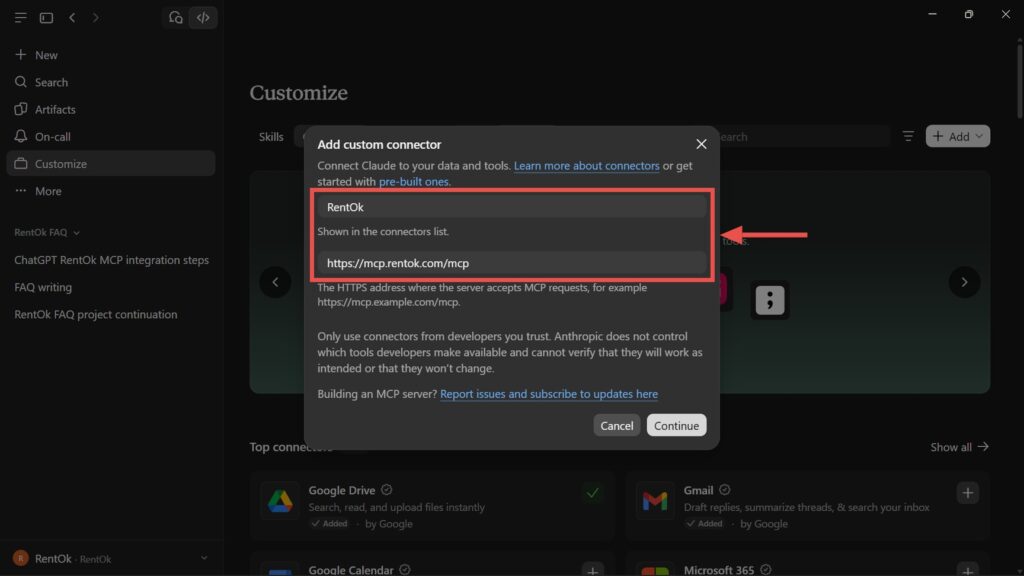
- Open claude.ai (or the Claude app) and go to Customize → Connectors.
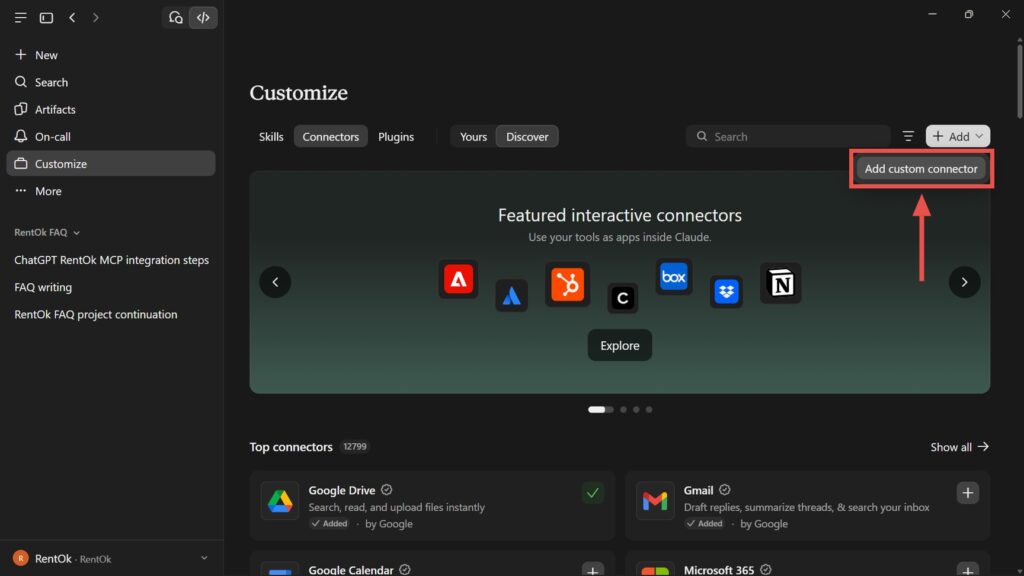
- Click Add, then Add custom connector.
- Name it RentOk MCP.
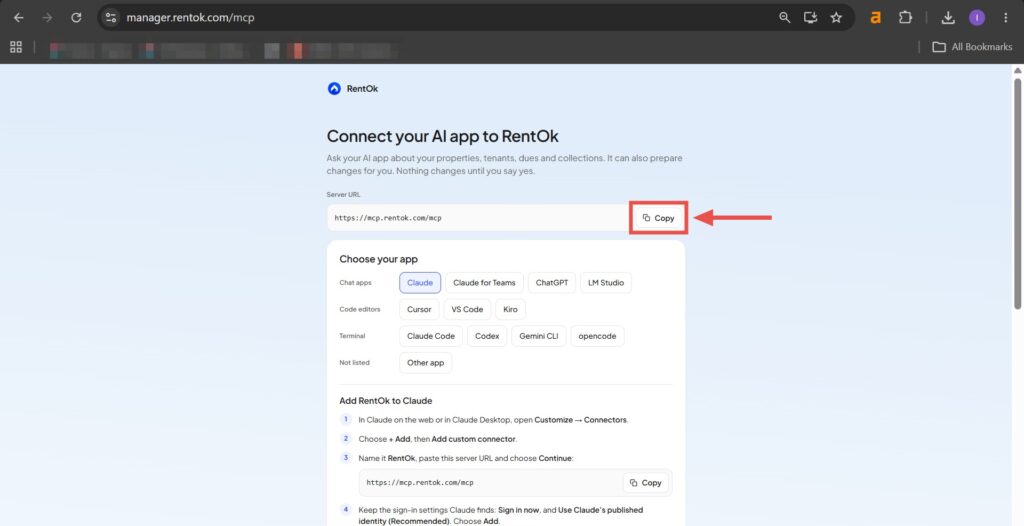
- Paste this URL:
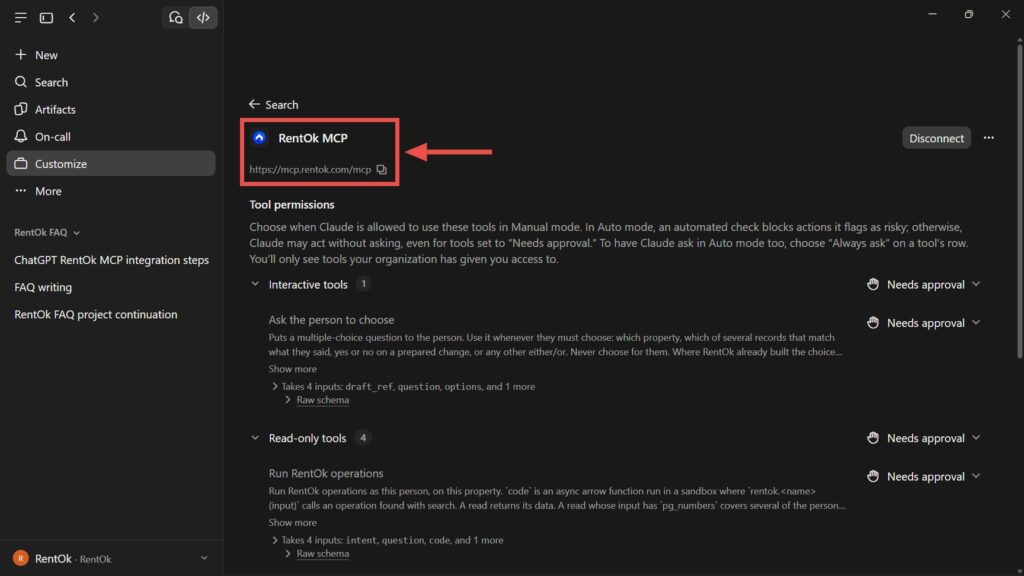
https://mcp.rentok.com/mcp - Click Add, then Connect.
- Sign in with the same login you use for the RentOk Manager app on the web.
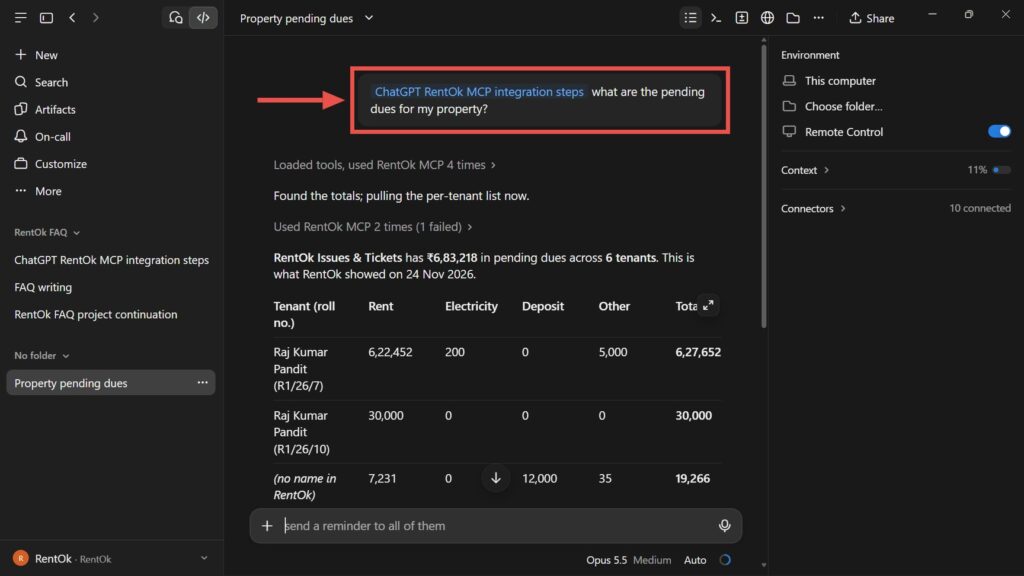
- Open a new chat, click +, and switch on RentOk MCP under Connectors.
- Ask your first question.
Claude asks your permission before each lookup at first. If you’d rather it didn’t, open the connector in Customize → Connectors and set its tools to Always allow.
This works on every Claude plan, including Free. A Free account gets one custom connector, which is enough for RentOk MCP.
How do I connect RentOk MCP to ChatGPT?
In ChatGPT, you add RentOk as a custom MCP server and paste the same link. You’ll need ChatGPT Pro, Business or Enterprise. The free plan and Plus don’t support custom MCP servers yet.
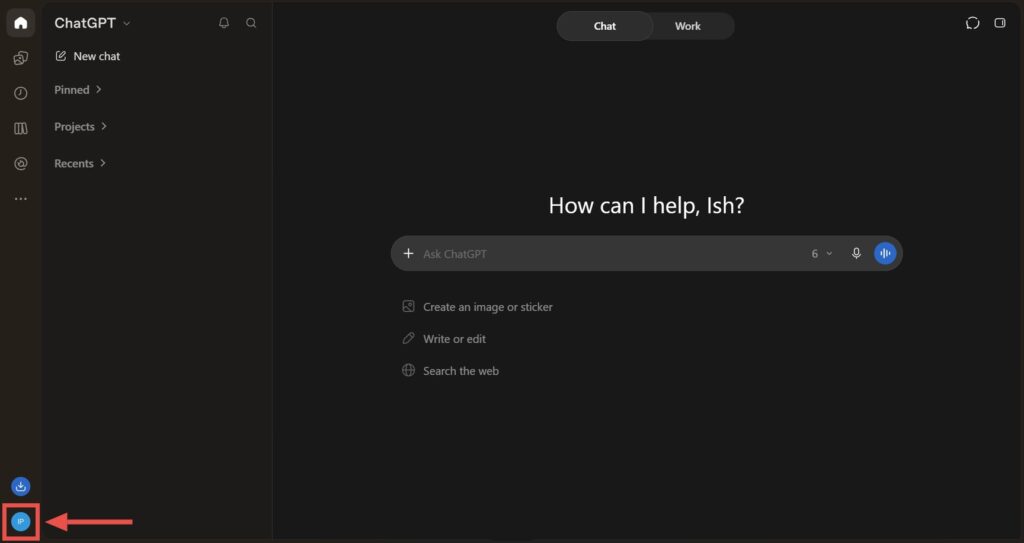
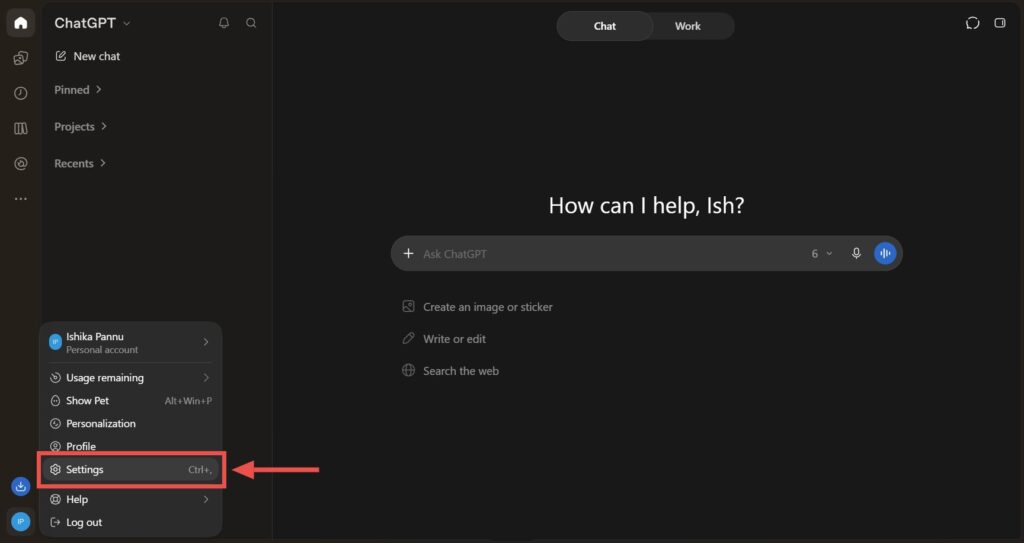
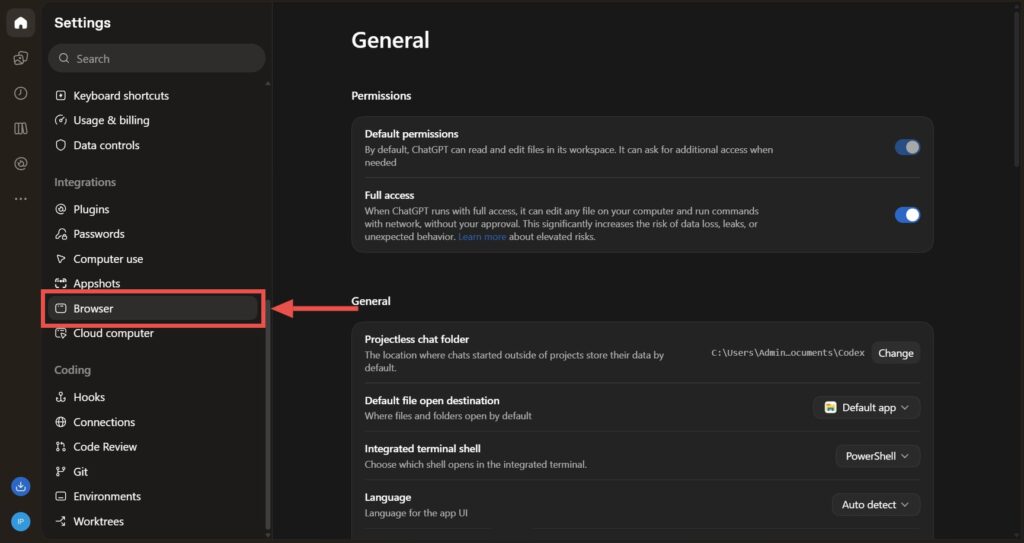
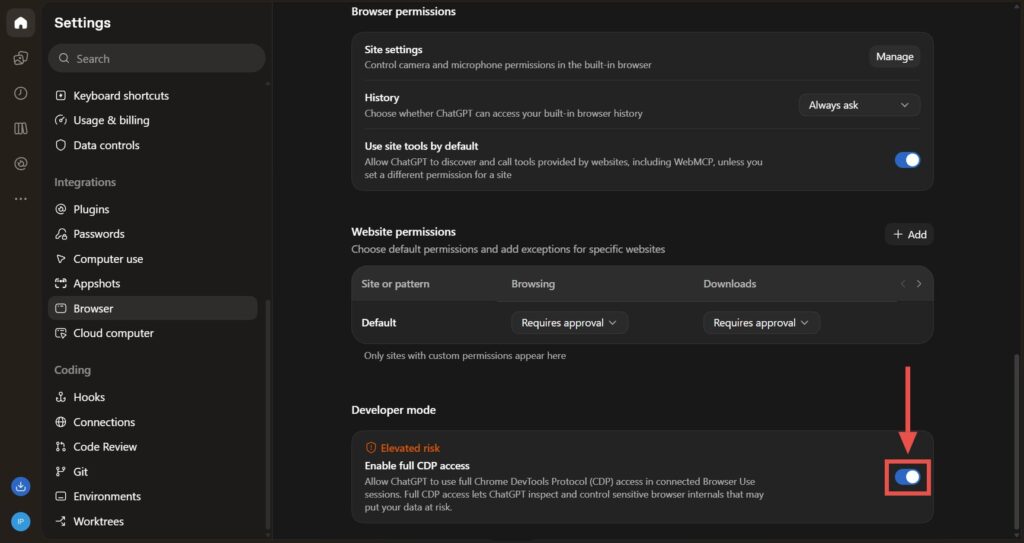
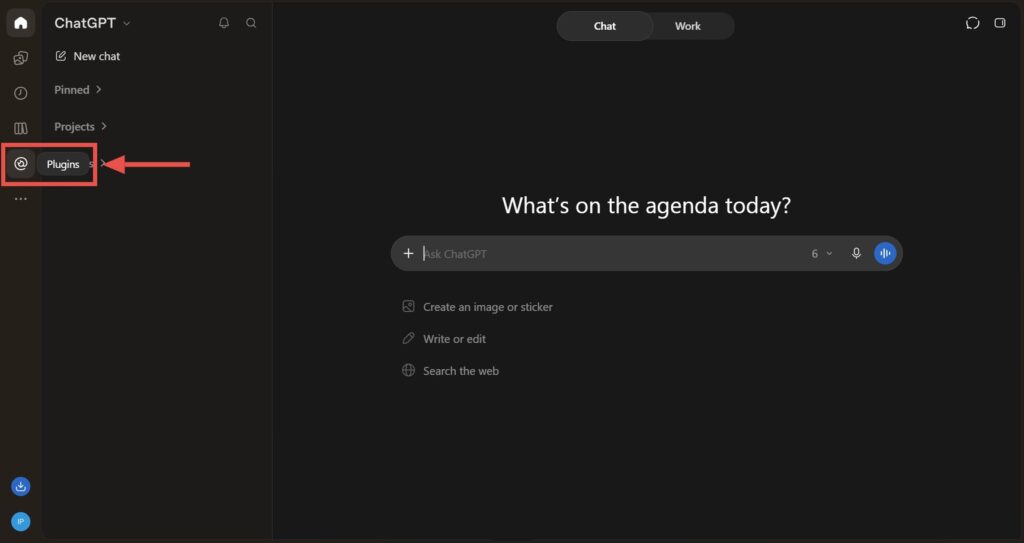
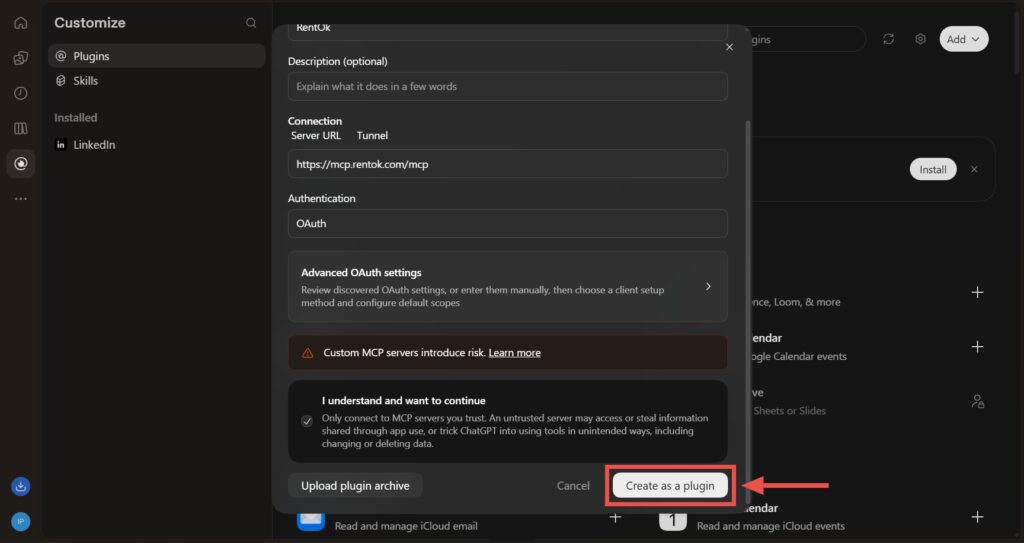
- Open ChatGPT → Settings → Plugins.
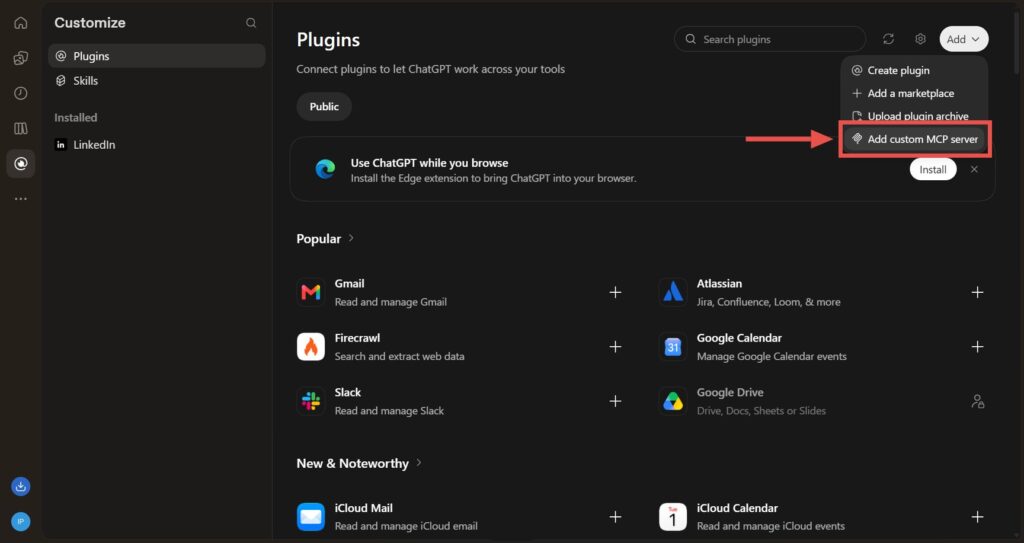
- Click +, then Add custom MCP server.
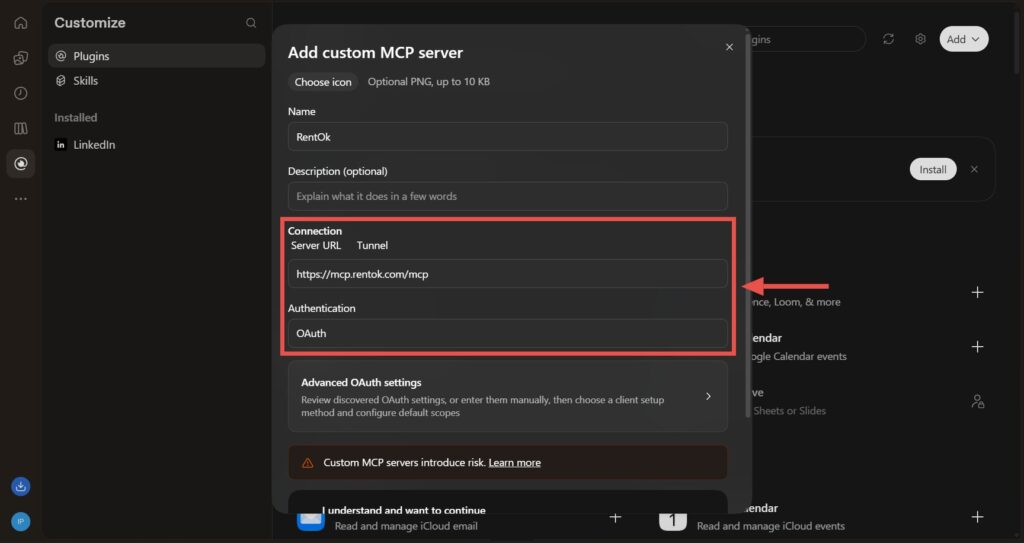
- Name it RentOk MCP.
- Paste this URL:
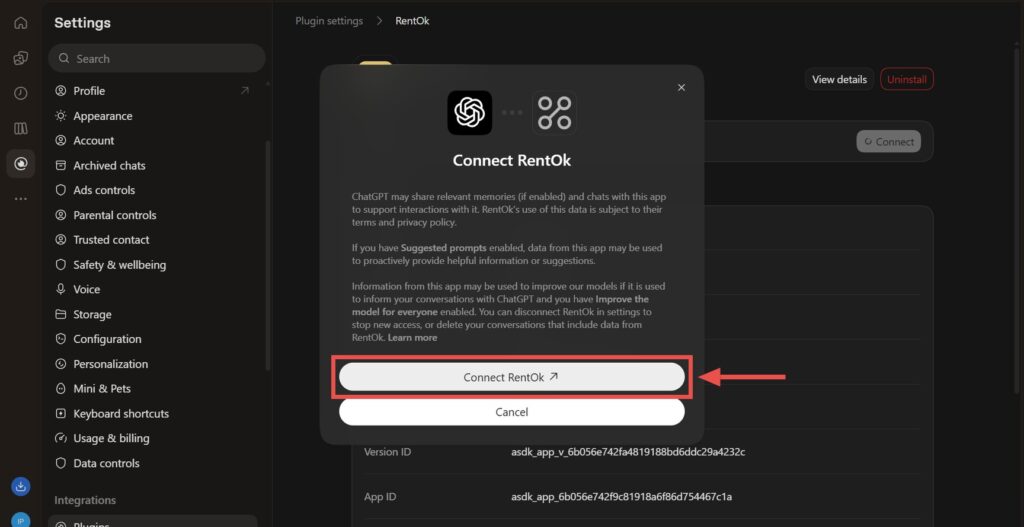
https://mcp.rentok.com/mcp - Choose OAuth for sign-in and accept the warning about custom servers.
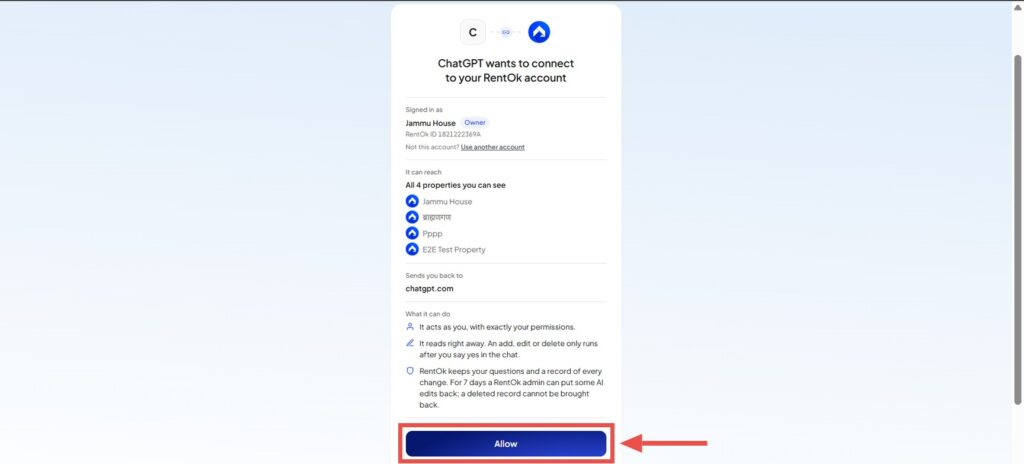
- Sign in with the same login you use for the RentOk Manager app on the web.
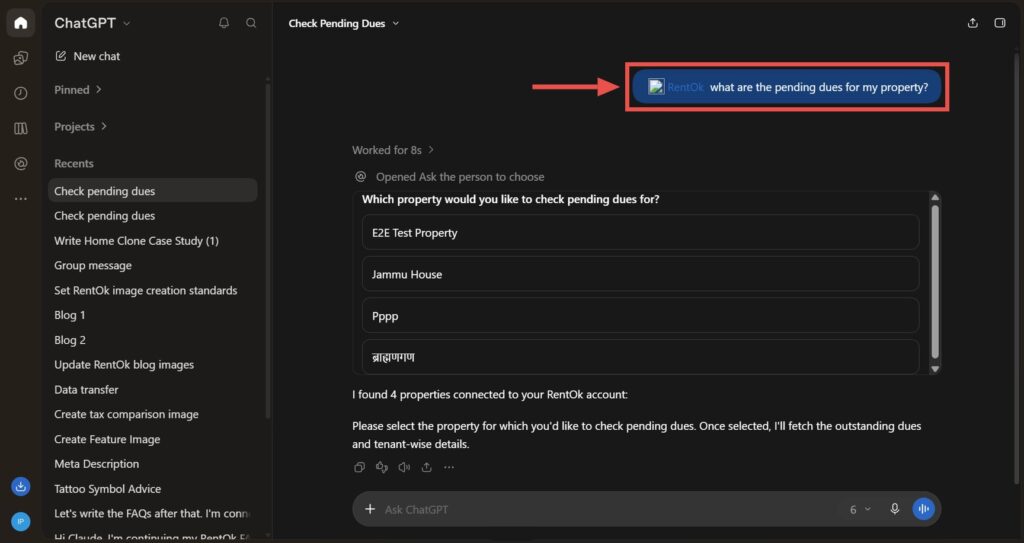
- In a new chat, pick RentOk MCP from the + menu and ask your question.
On ChatGPT Business, only the workspace owner or an admin adds the server. Everyone else then connects their own RentOk login. ChatGPT renames these menus often, so if a button has moved, search Settings for “MCP”.
Is my data safe?
Yes, and here’s what keeps it safe.
- It only reads. RentOk MCP doesn’t collect rent, message tenants, edit a bed or delete anything. All 154 actions are reads.
- You see only your own account. The assistant sees what your RentOk login can see, and nothing more. A manager’s login sees only what that manager can see in the app.
- Owner-only data stays with the owner. Bank details, announcements and team contacts are only available to the owner’s login.
- You can disconnect anytime. Remove the connector from Claude or ChatGPT settings and its access stops.
One limit to know: the answers are only as good as what’s in your RentOk account. If a manager marked a cash payment late, or never added a tenant, the assistant won’t know about it either.
What it can’t do (yet)
This matters, because some operators expect more than it does today.
- It doesn’t send anything. It writes a rent reminder for you to copy into WhatsApp, and you send it yourself.
- It doesn’t make changes. Adding a tenant, marking a payment or changing a bed still happens in the RentOk app.
- It doesn’t replace your CA. It totals your expenses, but tax filing and legal advice still need a professional.
Which operators get the most out of it?
Every question above works for every operator. Where you start depends on your size:
| You run | Start with this question |
|---|---|
| 1 PG, under 40 beds | “Who owes rent this month, and how much in total?” |
| 1 PG, around 100 beds | “Which beds have been vacant longest, and since when?” |
| 3–10 properties | “Compare collections and vacancy across all my properties this month.” |
| 10+ properties | “Which property has the most open complaints and pending dues right now?” |
| You’re a manager | “Which tenants check out this week, and is their KYC complete?” |
How RentOk helps
The app already holds your tenants, dues and beds (here’s what you get with free PG management software and when a spreadsheet stops being enough). RentOk MCP adds one thing: you can ask a question across all of it in one sentence, without learning where each report sits. That’s what turns a 15-minute check across three screens into a single question. It doesn’t replace the app. You still record payments and check-ins there, and the assistant reads what you’ve recorded.
Try this today
Open Claude or ChatGPT and connect RentOk MCP using the steps above. Ask one question: “Who hasn’t paid rent this month?”
Check the answer against your dues screen in the app. If the two match, you’ve got a second manager who answers in seconds. If they don’t, you’ve found an entry that needs fixing. Either way, it takes 10 minutes.
Frequently Asked Questions
Find answers to common questions about this topic
About the Author
Anil Kandpal
Anil Kandpal is the Head of Marketing at RentOk and a seasoned property rental industry expert with over 8 years of hands-on experience in the PG, hostel, and co-living sectors. Since 2017, Anil Kandpal has built deep expertise across every facet of the property rental ecosystem. He founded Capho, a PG and hostel aggregator platform that connected renters with quality accommodation options across India. Following this, he spent two years as an operator, managing his own co-living and PG business, giving him invaluable first-hand insights into the challenges faced by property owners and managers. Currently, Anil Kandpal leads growth and marketing strategies at RentOk, a B2B SaaS property management platform, where he helps PG owners, hostel operators, and property managers streamline their operations and scale their businesses. His unique perspective combines entrepreneurial experience, operational expertise, and data-driven marketing strategies, making him a trusted voice on topics including PG management, rental property operations, tenant acquisition, and PropTech solutions.
...read moreAnil Kandpal is the Head of Marketing at RentOk and a seasoned property rental industry expert with over 8 years of hands-on experience in the PG, hostel, and co-living sectors. Since 2017, Anil Kandpal has built deep expertise across every facet of the property rental ecosystem. He founded Capho, a PG and hostel aggregator platform that connected renters with quality accommodation options across India. Following this, he spent two years as an operator, managing his own co-living and PG business, giving him invaluable first-hand insights into the challenges faced by property owners and managers. Currently, Anil Kandpal leads growth and marketing strategies at RentOk, a B2B SaaS property management platform, where he helps PG owners, hostel operators, and property managers streamline their operations and scale their businesses. His unique perspective combines entrepreneurial experience, operational expertise, and data-driven marketing strategies, making him a trusted voice on topics including PG management, rental property operations, tenant acquisition, and PropTech solutions.