
Legal
How to Update Your Aadhaar Address Using a Rent Agreement

Written by
Ishika Pannu
Read Time
12 min read
Posted on
November 17, 2026
Overview
Overview
How to Update Your Aadhaar Address Using a Rent Agreement
A move into a rented flat or PG often leaves your Aadhaar showing an address you no longer use. A valid rent agreement can help you update it, provided the document identifies you and supports the address you want to record. You do not need to own the property to use an accepted residential address proof.
There is an important correction to older advice about aadhaar address change with rent agreement: UIDAI’s published document list includes registered or unregistered rent, lease and leave-and-licence agreements. Registration is not a universal UIDAI requirement for this category, although separate rental laws may still require it. This guide explains the checks, online submission, centre-based alternative and options for PG residents without an agreement, using information checked on 17 November 2026.
Can a rent agreement work as address proof for Aadhaar?
Yes. UIDAI’s accepted-document framework includes valid rent, lease and leave-and-licence agreements as Proof of Address (PoA). The update list identifies these as address documents, not as a substitute for every other kind of identity evidence. Check the applicable category in UIDAI’s current supporting-document list.
The agreement should establish a clear connection between you and the rented premises. Before applying, check that it:
- Names you as an occupant or tenant: A document naming only your flatmate does not establish your own document-based claim. If you share accommodation, ask for proper documentation of your place in the arrangement.
- Identifies the address: Check the house or flat number, building, locality, city, state and PIN code. The document must support the address you request.
- Remains valid: Use the current, completed agreement rather than an expired document or an unsigned draft. Resolve mistakes with the other party before uploading it.
RentOk’s guide to creating a properly documented rent agreement explains the party, property and tenancy details worth recording. Do not alter a scan yourself to add your name or change the address; obtain a genuine corrected or replacement document.
Does the agreement need registration or notarisation?
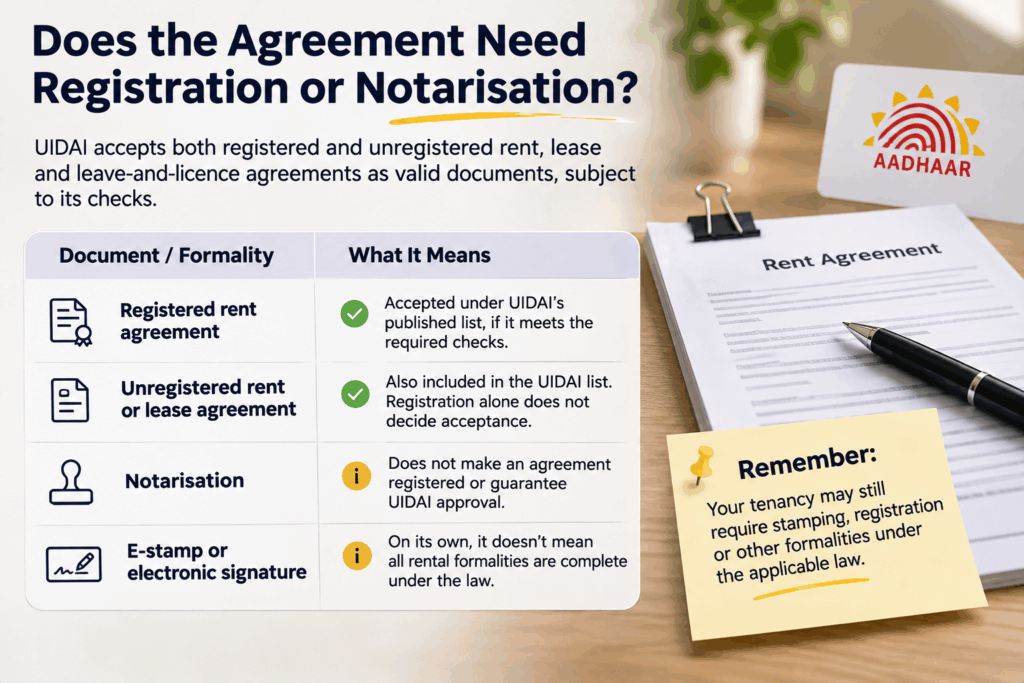
UIDAI acceptance and rental-law formalities are separate checks. The published list includes registered and unregistered rent, lease and leave-and-licence agreements. It does not support a blanket statement that a notarised agreement must fail simply because it lacks registration.
| Document or formality | What it means for this application |
|---|---|
| Valid registered rent agreement | Falls within the listed agreement category, subject to the document and requested details meeting UIDAI’s checks |
| Valid unregistered rent or lease agreement | Also appears in the published category; do not assume registration alone determines acceptance |
| Notarisation | Does not turn an agreement into a registered instrument or guarantee UIDAI approval |
| E-stamp or electronic signature | Does not, by itself, establish that every required rental formality is complete |
The wording about registration with the Registrar Office also appears beside sale agreements and gift deeds in the document list. Do not read that wording as cancelling the same entry’s express inclusion of unregistered rental agreements. UIDAI’s published regulations set out the distinction.
Your tenancy may nevertheless require stamping, registration or other formalities under the applicable law. RentOk’s notarised-versus-registered agreement guide explains why one process does not replace the other. Acceptance as Aadhaar address proof does not cure a separate defect in the rental arrangement.
Updating your address online through myAadhaar
For the myAadhaar portal route, keep your Aadhaar number, access to the registered mobile number for OTP authentication, and a clear copy of the supporting agreement ready. UIDAI’s online-update guidance confirms the registered-mobile and supporting-PoA requirements.
Check the agreement before starting. RentOk’s guide to reading a rent agreement before signing helps you review names, property details and the actual terms. A tidy scan will not fix an agreement that identifies the wrong person or premises.
Sign in and enter the supported address
- Open the official service: Visit myAadhaar, or follow the address-update link from UIDAI’s official website. Sign in with your Aadhaar number and the OTP sent to your registered mobile, completing the displayed security checks.
- Choose address update: Select the service for changing the address and the document-based option. Do not confuse it with Document Update, which refreshes supporting documents for details already recorded. Menu labels may change as the portal evolves.
- Enter the new address: Complete the required fields using the agreement as your reference. Review the PIN code, post office and any automatically populated location fields. Check both English and the local-language preview before proceeding.
The address must correspond to the supporting document, but “word-for-word in every field” is too rigid as a universal rule. UIDAI’s form instructions allow minor address variations in the stated circumstances. They do not permit replacing the base address with a different one. Care of (C/o) is optional; do not treat a father’s or husband’s name as compulsory for every adult’s address.
Upload the agreement, review and pay
- Select the matching document category: Choose the current rent, lease or leave-and-licence entry that fits your document. Upload a clear colour scan of the original, including the pages needed to establish the parties, address, validity and execution. Follow the file types and size limit shown on the live screen rather than assuming every upload accepts the same format or a universal 2 MB limit.
- Review the complete request: Recheck the address, language preview and uploaded pages. Correct errors before confirming the declaration and payment. UIDAI’s current service page lists ₹75 for address update, replacing the ₹50 figure still present in some older instructions. Check the amount displayed before paying.
- Save the acknowledgement: Retain the payment receipt and Service Request Number (SRN) generated for the request. Use the official status service to follow progress. Payment and acknowledgement establish submission, not approval of the new address.
If details span several pages, combine them into a readable PDF where the upload service permits it. Avoid compressing the file until names, dates or signatures become unclear. Do not upload only an e-stamp page if it omits the actual rental details.
Visiting an Aadhaar centre and tracking the result
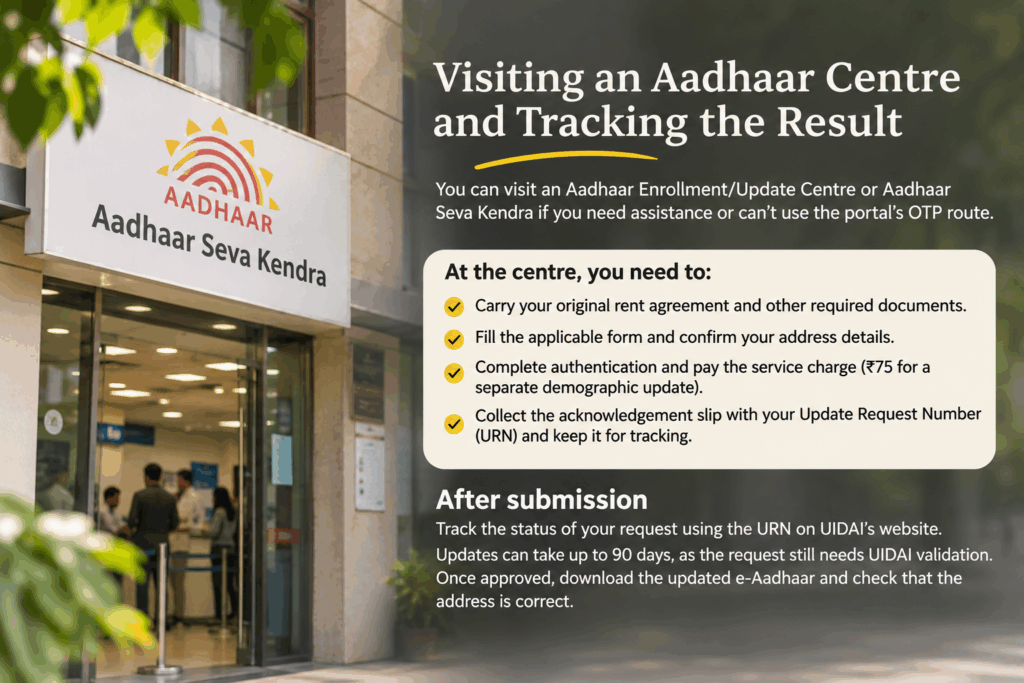
An Aadhaar Enrolment/Update Centre or Aadhaar Seva Kendra offers an alternative when you need assistance or cannot use the portal’s OTP route. Use UIDAI’s official website to locate a centre and check appointment availability. A centre visit still requires accepted supporting evidence; it does not waive the PoA conditions.
Carry your original valid agreement and other documents required for the selected update. Complete the applicable form, ask the operator to enter the address and review the captured details carefully. Follow the prescribed authentication process and pay the applicable service charge. UIDAI’s Aadhaar Seva Kendra guidance lists ₹75 for a separate demographic update; other services or combinations can have different charges.
The originals should be returned after checking and scanning. Collect the acknowledgement and retain the update reference printed on it, such as a URN, for tracking. Do not leave the centre without checking that the slip records the correct request.
A submitted request still needs UIDAI validation
Follow the status using the reference associated with your submission. Avoid paying an intermediary who promises guaranteed approval or an unofficial fast-track result. UIDAI must validate the supporting information before changing the record.
UIDAI’s general update-status guidance says updates can take up to 90 days and directs applicants to seek help if a request exceeds that period. Do not treat an average turnaround as a guaranteed completion date. After approval, download the updated e-Aadhaar and check that the address is correct before using it elsewhere.
What should you do if UIDAI rejects the request?
Read the rejection reason before submitting another application. Re-uploading the same document without correcting the problem can repeat the failure. UIDAI’s address-update FAQs identify the accepted document category, applicant’s name, address match and clear colour scan among the key document checks.
| Problem to investigate | Practical correction |
|---|---|
| Agreement does not name you | Obtain genuine documentation naming you, or use another eligible PoA or applicable family-based route |
| Requested address differs from the agreement | Correct the entry or obtain a genuine document supporting the actual address |
| Missing pages or unreadable scan | Scan the necessary original pages again, preserving legibility and the required details |
| Expired or incomplete document | Use a valid completed document or another currently accepted proof |
| Wrong upload category | Select the appropriate live category; do not mislabel a rental document as a different proof |
If the reason remains unclear, use UIDAI’s grievance and feedback channels or call 1947. Keep the SRN or other update reference, rejection message and document details ready. A grievance can help clarify the issue; it does not guarantee reversal or approval.
Keep documents private during follow-up. RentOk’s guide to handling tenant KYC documents responsibly explains why sensitive files should not circulate casually. Avoid posting complete Aadhaar records in public groups or sharing login OTPs with an agent, landlord or support impersonator.
Living in a PG without an agreement: your options
Start by asking the operator for a proper written agreement that reflects your real accommodation. Include your name, complete address, room or bed where relevant, occupancy period and the other agreed terms. RentOk’s PG rental agreement format guide provides context for recording a managed-accommodation arrangement.
A document titled “PG agreement” does not automatically qualify under every UIDAI category. Check its substance against the current list and use an accepted alternative if necessary. An ordinary PG ID card, payment screenshot or informal manager’s letter is not automatically a listed PoA simply because it shows where you stay.
Other address proofs and the family-based route
Depending on your records, alternatives can include:
- Another accepted PoA in your own name: Check eligible bank or post-office documents, utility bills or other entries in UIDAI’s update list. Follow the exact recency, photograph, stamp and signature conditions for the document you choose; not every downloaded bank statement qualifies automatically.
- Head of Family (HoF)-based address update: Where you genuinely live at the same address as an eligible family member, check this route with their consent and the prescribed relationship evidence or permitted declaration. A landlord or unrelated flatmate does not become your HoF merely by agreeing to help.
- A certificate in UIDAI’s prescribed format: Check whether an authorised certifier listed for the update process can issue it for your circumstances. A generic letter on PG or college letterhead does not automatically meet this requirement.
Use UIDAI’s supporting-document list to check the selected proof. UIDAI’s HoF guidance explains the consent-based family route; follow the current portal instructions for the relationship and approval process. Always use the address where you actually reside, rather than borrowing one solely to complete the application.

How RentOk helps you prepare a rent agreement
An address-update application starts more easily when your rental agreement already names the right people and identifies the accommodation clearly. RentOk supports digital agreement preparation, signing and access to the completed document, helping residents and operators maintain a consistent rental record.
- Review the agreement details: Check the resident’s name, property description and occupancy terms before signing. Resolve errors with the operator so the completed agreement reflects the actual arrangement.
- Include co-tenants where supported: RentOk’s multi-party workflow allows operators to add co-tenants and other agreement parties. This can help shared accommodation avoid an agreement that records only one resident while omitting the others.
- Complete the supported signing process: Aadhaar e-Sign is available through the supported configuration. Check enablement with the operator and complete any separate stamp-duty or registration formalities that apply to the agreement.
- Retrieve the final PDF: Once the required parties sign, the completed agreement PDF becomes available through the tenant-profile workflow. Keep your own copy and prepare a readable upload that meets UIDAI’s current requirements.
RentOk’s multi-party agreement documentation explains these capabilities. Signing an agreement with Aadhaar does not update the address in Aadhaar. You must submit the address-change request separately, and UIDAI decides whether the evidence qualifies.
Conclusion
You can use a valid rent agreement as address proof for Aadhaar, and UIDAI’s published list includes registered and unregistered rental agreements. Focus on the current document category, your name, the supported address and a clear complete upload. Check rental-law formalities separately, and use the official update service rather than an unrelated document-refresh option.
Get a rent agreement on RentOk that accurately records your accommodation, retain the completed copy and submit the address update through UIDAI’s accepted route. Save the acknowledgement, track the result and check the updated e-Aadhaar after approval. If you have no agreement, explore a genuine alternative PoA or the eligible HoF route.
Frequently Asked Questions
Find answers to common questions about this topic
About the Author
Ishika Pannu
Ishika Pannu brings you the latest insights and easy-to-apply strategies in property management—helping you simplify renting and grow with RentOk.