
Legal
CCTV in PGs: Where You Can Install Cameras, Where You Can’t, and How Long to Keep Footage

Written by
Ishika Pannu
Read Time
11 min read
Posted on
November 3, 2026
Overview
Overview
CCTV in PGs: Where You Can Install Cameras, Where You Can’t, and How Long to Keep Footage
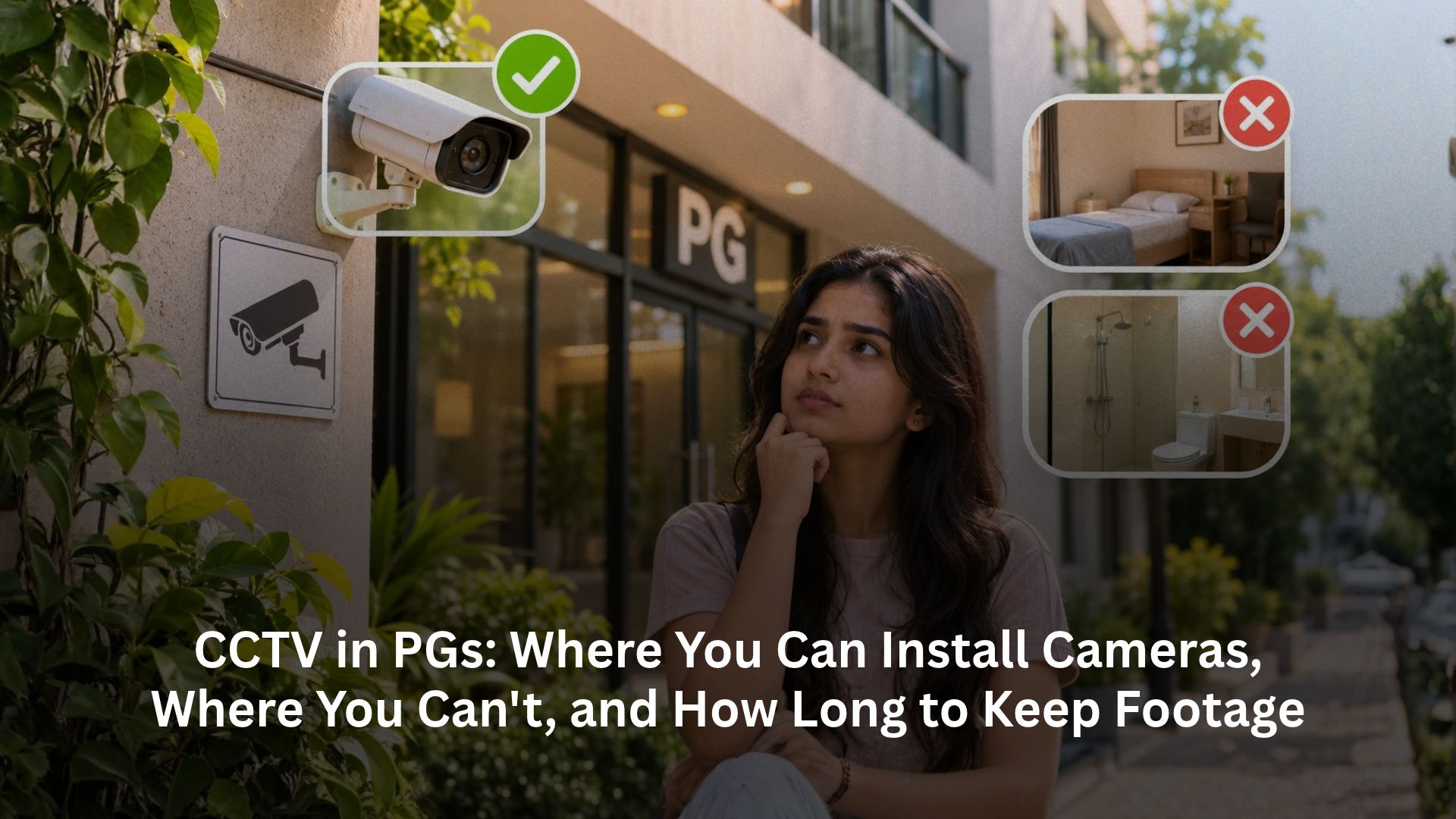
A camera above the PG gate can help explain how an unknown person entered. The same camera, pointed through a bedroom doorway, can expose a resident’s private life. For owners, responsible surveillance starts with that distinction: cover the security risk without recording more of someone’s home than the purpose requires.
CCTV rules in PG accommodation depend on location, applicable orders and privacy safeguards. There is no single national requirement that every PG must install the same cameras or keep recordings for 30–45 days. This guide separates current requirements from proposals, explains suitable camera positions, and covers notices, consent, retention, secure access and installation costs. A working system should produce usable evidence when necessary while protecting the people who live under it.
Where is CCTV mandatory for PGs?
Start with the property’s municipal licensing conditions and current police or court directions. A rule for one city, district or category of accommodation does not automatically govern every Indian PG.
| Location or framework | What owners should understand |
|---|---|
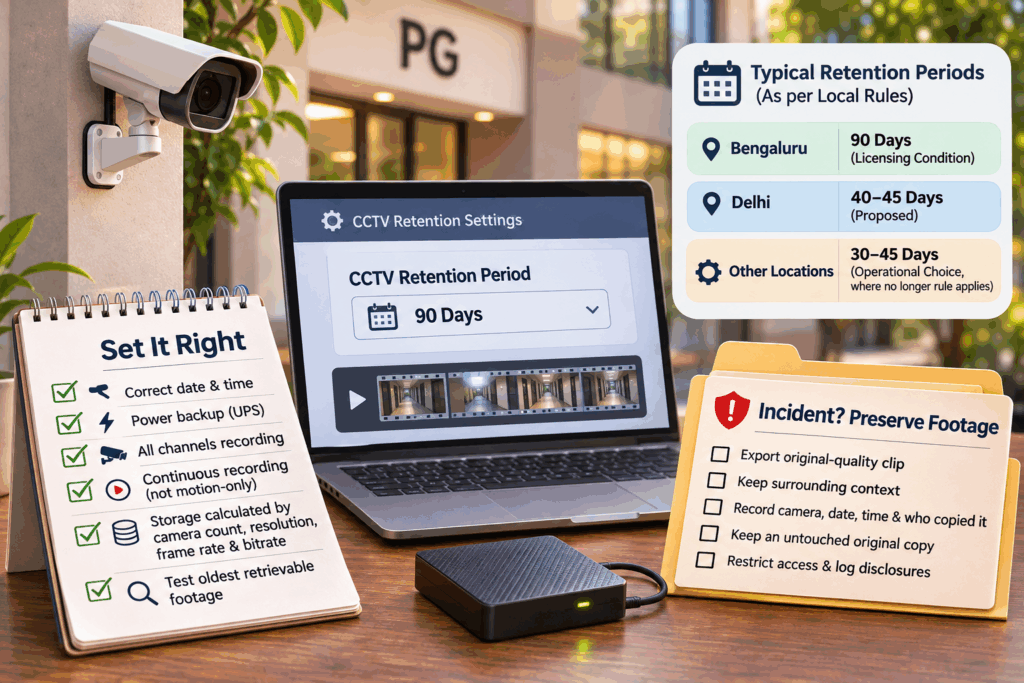
| Bengaluru | The earlier BBMP licensing condition requires CCTV coverage of entries, exits and corridors, with 90-day storage from each camera. Later court directions also address functioning equipment, privacy and evidence preservation. |
| Delhi proposals | October 2026 reporting describes a recommendation for 40–45 days of backup at entrances, exits and common areas. A proposed requirement is not proof of an operative city-wide mandate. |
| Other locations | Check the applicable local order, licence conditions, property category, retention requirement and validity period. Ask the issuing authority when the position is unclear. |
The Karnataka High Court’s 10 September 2026 order requires meaningful CCTV checks and prohibits surveillance in private spaces. The earlier licensing conditions reproduced in court reporting supply the 90-day figure. RentOK’s Bengaluru PG rules guide connects these checks with daily operations.
For Delhi, the 9 October report on proposed regulations expressly describes future recommendations. Do not use an old or expired district order, or an earlier draft’s different retention figure, as evidence of today’s universal rule.
Camera placement: shared access, private boundaries
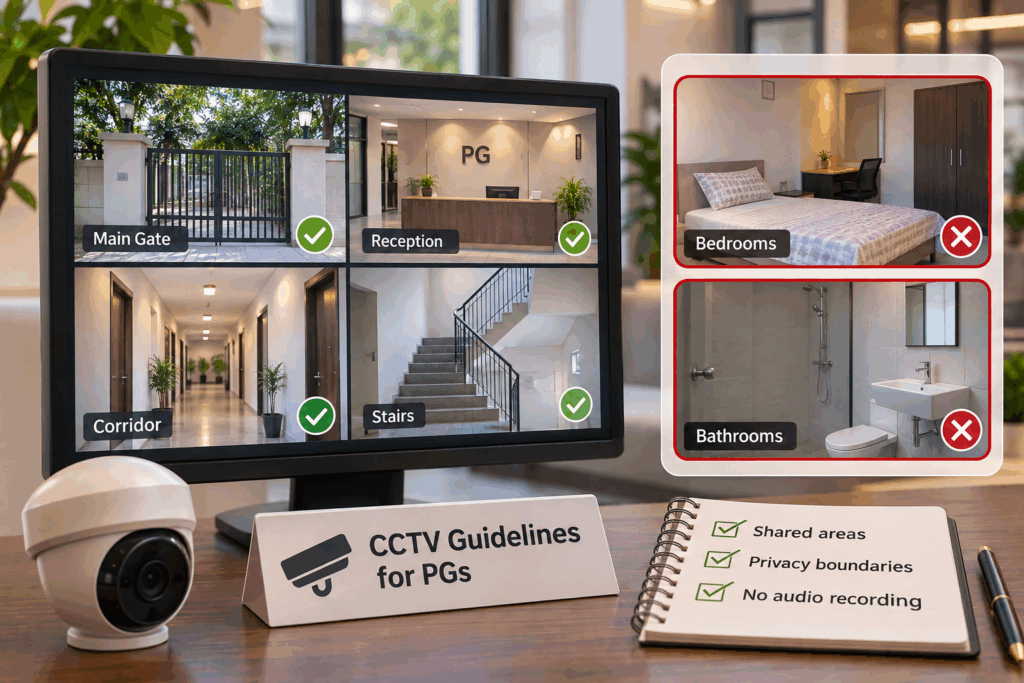
Appropriate positions generally include main gates, entry and exit points, reception lobbies, shared corridors, stair landings, parking areas and open courtyards. Aim cameras at the relevant access route; the fact that an area is communal does not justify recording every activity there.
Keep cameras out of bedrooms, private study spaces, bathrooms, toilets, showers and changing areas. The Bengaluru order expressly protects places where occupants have a legitimate expectation of privacy. A shared bedroom remains a sleeping space, even when several residents occupy it. The constitutional right to privacy under Article 21 informs these safeguards; specific remedies depend on the facts and applicable law.
Check the view with doors open. A corridor camera can intrude into a bedroom without sitting inside it. Reposition the lens or apply an effective privacy mask. Boundary-wall cameras should not look through neighbouring windows or record private balconies and adjoining homes unnecessarily.
For CCTV in a girls’ PG, the same privacy boundaries apply. Non-consensual recording can also engage criminal provisions: Section 77 of the Bharatiya Nyaya Sanhita addresses voyeurism involving women’s private acts, while IT Act Section 66E addresses specified privacy-violating images of private areas. Their application depends on the facts.
Disable microphones by default. Audio captures conversations beyond what an entrance-security purpose usually needs. Do not assume a camera notice authorises continuous sound recording; obtain specific legal advice before enabling it. RentOK’s girls’ PG viewing checklist helps residents ask about coverage without requesting other people’s private footage.
Do tenants need to consent to CCTV?
There is no single nationwide PG-specific consent form that settles every installation. Identify the legal basis for the surveillance, any binding local requirement and the applicable privacy framework. A signed agreement cannot legitimise cameras in bathrooms or other intrusive recording.
Use clear, readable signs before people enter each monitored zone. Tell residents during onboarding which areas cameras cover, whether audio is off, the security purpose, the retention policy and the contact for complaints or footage requests. Signage informs people; it does not, by itself, prove valid consent.
Put those details in the handbook or a separate CCTV notice. RentOK’s tenant-handbook guide explains why residents need usable information rather than verbal instructions. For example, “CCTV operates at the gate and common corridor for access security” is more useful than “management may monitor residents at any time”.
Transparency does not mean unrestricted viewing
Do not give every resident or staff member access to the live feed. Establish who handles requests, who approves exports and how you protect other people appearing in a recording. A theft complaint may justify preserving a relevant time window, not distributing the entire day’s footage.
Explain visitor procedures separately. A guest invitation, identity check or CCTV notice serves a different purpose from permission to share recordings. RentOK’s visitor-policy guide helps keep access management distinct from controlling residents’ personal lives.
How long should you keep CCTV footage?
Use the applicable retention requirement, not a generic residential estimate. Some operators choose a 30–45-day routine cycle where no binding longer requirement applies, but that is an operational choice, not a national legal standard. Bengaluru’s earlier licensing condition specifies 90 days; Delhi’s reported 40–45-day proposal remains a separate issue.
Write down the selected period and its basis. Ask the installer to calculate usable storage from the camera count, actual bitrate, resolution, frame rate, compression and recording schedule. A hard drive advertised as “one month backup” may overwrite much sooner at your settings. Test the oldest retrievable recording rather than trusting the package description.
Keep the date and time accurate, verify power backup and check whether all channels actually record. Avoid motion-only settings if they conflict with a continuous-recording requirement or miss relevant movement. RentOK’s women’s safety guide explains why visible equipment alone cannot establish a functioning safety system.
Preserve incidents before the routine overwrite
After a theft, serious security incident, police inquiry or relevant dispute, promptly preserve the necessary footage before automatic deletion. Export the original-quality segment, keep the surrounding context and record the camera, date, time and person making the copy. Follow any lawful preservation direction.
Keep an untouched original and use a separate working copy if needed. Restrict access and record disclosures. Review the preservation hold with the investigating authority or legal adviser; do not delete evidence automatically, or retain unrelated recordings indefinitely because one incident occurred.
Secure storage and the current DPDP position
Recordings that identify people can constitute digital personal data under the Digital Personal Data Protection Act. A commercial PG should not assume that the Act’s personal-or-domestic-purpose exclusion covers its business surveillance.
As of 3 November 2026, the framework has phased commencement. The official commencement notification schedules the main processing obligations for May 2027. Do not describe all DPDP notice, consent, security and erasure duties as already operational today.
The notified Rules address security safeguards, access controls and retention, including separate one-year data/log provisions. Assess their application before setting your post-commencement policy. Neither the Act nor the phrase “privacy compliance” establishes a universal 30-day CCTV deletion rule.
Practical safeguards to implement now
- Limit access: Give named authorised staff only the permissions they need. Remove an installer’s continuing remote access unless you have explicitly authorised and controlled it.
- Protect recordings: Use strong unique passwords, current firmware, a locked recorder location and encryption where supported. Check the cloud provider’s security and access arrangements before uploading footage.
- Control sharing: Use recordings for the stated security purpose. Keep access and export records; avoid public monitor screens, informal WhatsApp circulation or clips used to shame residents.
- Manage deletion and faults: Schedule routine overwriting around applicable requirements and incident holds. Test playback, document failures and assign someone to arrange repairs.
Train staff to escalate a complaint about a camera angle or leaked clip promptly. Residents should have an accountable contact, and suspected criminal conduct needs the appropriate police route rather than only an internal discussion.
What does a basic PG CCTV setup cost?
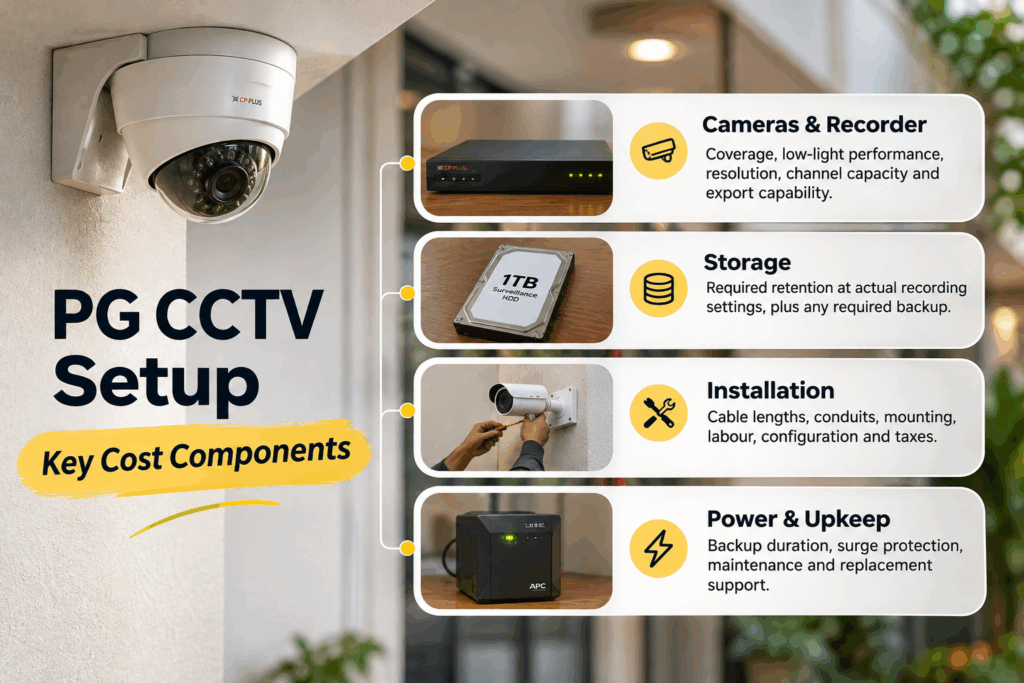
The CCTV installation cost depends on the building and retention requirement. As a dated hardware reference, a Moglix four-camera kit listing displayed ₹16,829 including taxes when checked for this article. It listed two dome cameras, two bullet cameras, a four-channel DVR, a 1TB surveillance drive and a power adaptor. Confirm the live price and exactly what installation includes.
That is a product example, not a complete PG compliance budget. Four cameras may miss necessary access points, and 1TB does not establish 90-day storage. Avoid choosing a kit before surveying the building.
| Quote component | What to confirm |
|---|---|
| Cameras and recorder | Coverage, low-light performance, resolution, channel capacity and export capability |
| Storage | Required retention at actual recording settings, plus any required backup |
| Installation | Cable lengths, conduits, mounting, labour, configuration and taxes |
| Power and upkeep | Backup duration, surge protection, maintenance and replacement support |
Ask for a site-specific, itemised quote and a recorded acceptance test: correct angles, useful night images, working timestamps, retrieval and export. Set a maintenance budget as well as an installation budget. More cameras do not compensate for poor positioning, unrestricted access or a recorder that silently stops working.
How RentOK helps manage visitors digitally
CCTV shows movement; staff still need a process for identifying visitors and connecting an arrival with the right resident. RentOK’s tenant-app offering describes entry-exit logs, guest invitations and leave information. Confirm which workflows your property has enabled before replacing an existing register.
- Organise guest information: Use supported guest-invitation features alongside your visitor policy. Staff should still confirm the person at the entrance and apply the relevant visiting hours and access limits.
- Keep movement records useful: Entry-exit and leave information can support follow-up when management needs context about an arrival or absence. Maintain accurate records without treating an invitation or app entry as conclusive proof of identity.
- Coordinate resident attendance: RentOK’s attendance settings support configurable attendance rounds and manager controls. Use the appropriate settings and permissions; attendance records are not a guaranteed real-time emergency headcount.
Pair those tools with a clear handover between security shifts and a process for missing check-outs or unusual arrivals. RentOK’s staff-performance guide connects security work with consistent records and follow-up.
Digital visitor management does not replace required cameras, secure footage storage, guards or local verification. It supports the administrative part of a security system that your team must still operate responsibly.
Conclusion
A responsible PG CCTV system has clear boundaries: cameras cover appropriate access areas, residents understand the monitoring, authorised staff control recordings and the storage period follows applicable requirements. Private bedrooms, bathrooms and changing spaces should never become the price residents pay for security. Test what the cameras actually capture and what the recorder can retrieve.
Start with your local requirements, then check angles, notices, storage and access permissions before buying additional equipment. Preserve relevant evidence when an incident occurs, and review your policy as the DPDP framework takes effect. Manage visitors digitally on RentOK to organise guest and movement workflows alongside appropriate CCTV coverage, accountable staff and respectful house rules.
Frequently Asked Questions
Find answers to common questions about this topic
About the Author
Ishika Pannu
Ishika Pannu brings you the latest insights and easy-to-apply strategies in property management—helping you simplify renting and grow with RentOk.